The Cozy Property Collection

Cozy Property Collection Logo Welcome to Your Home Away From Home

Your complete guide to a perfect stay

🔑 Check-In & Check-Out

Check-In Process

Check-in any time after: 3:00 PM
Enter provided code into door:
Allow a few second for the door to unlock

Check-Out Process

Check-out time: 10:30 AM
Lock all doors and windows
Turn off all lights and appliances
Place used towels in the washing machine
Take trash to outdoor bins (optional but appreciated)
When exiting lock the door by holding the lock button on the keypad for a few seconds

Door Lock Operation

This is the front door lock.
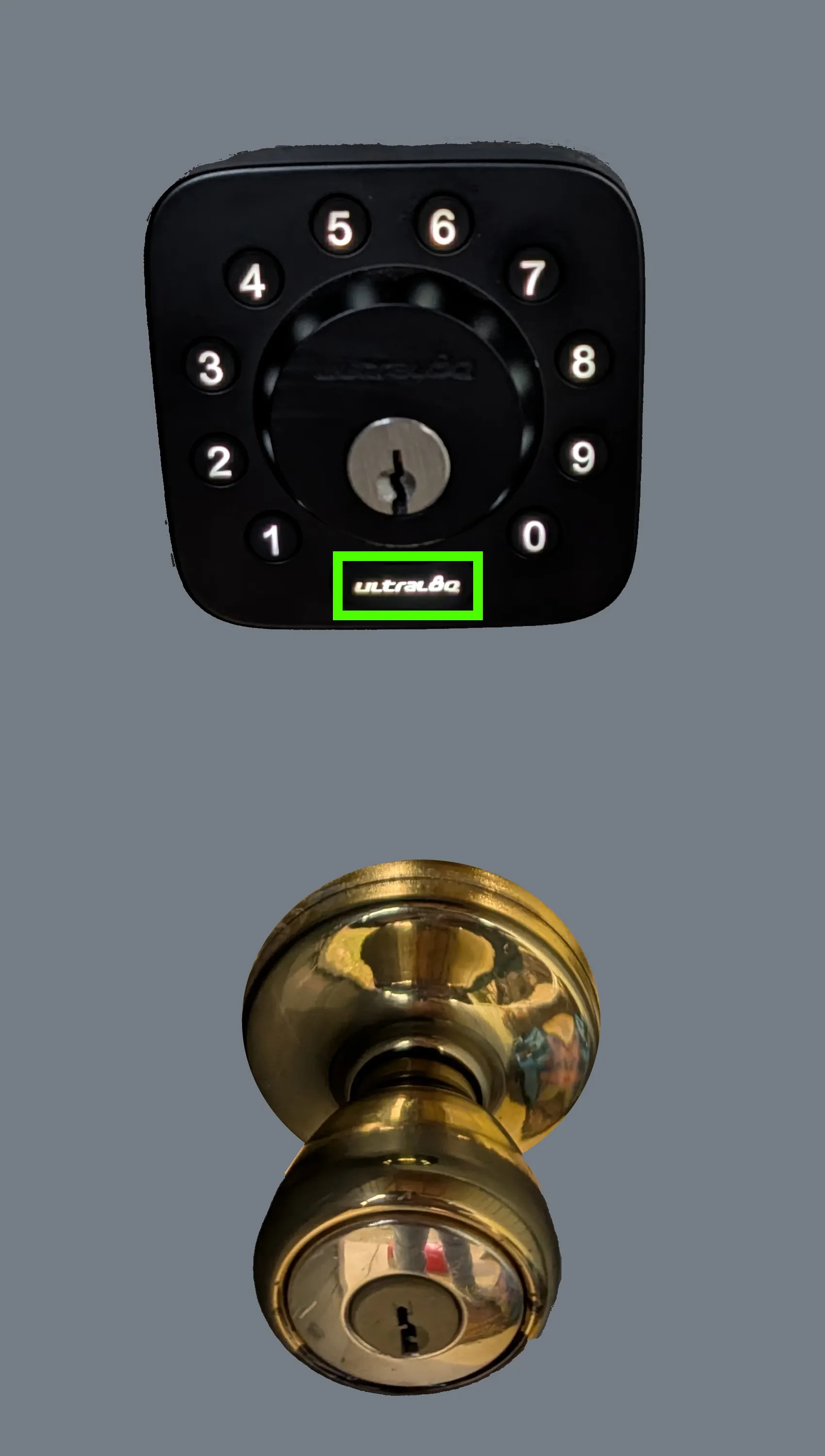
Front Door Lock
  • Ultral8 Button: Highlighted in GREEN.
  • To Unlock: Enter the code provided and then hit the Ultral8 Button
  • To Lock: Hit the Ultral8 Button one time (You should hear it lock)
  • If you are checking in at night, hit the Ultral8 Button to illuminate the keypad.
🛋️ Living Room Guide

TV & Entertainment System

TV Operation

Press power button on TV remote
Use input button to switch between Cable and Game Console (SNES)
Click the home button to select streaming services
Volume controls are on both TV and Cable remote

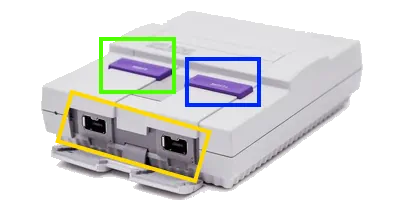
Super Nintendo Mini Console

Super Nintendo Mini. Power, Reset, and Controler Ports Circled
  • Power Button: Highlighted in GREEN
  • Reset Button: Highlighted in BLUE
  • Controller Port: Highlighted in YELLOW

How to Operate SNES Mini

Switch TV to HDMI 2 (Game Console) (How To Guide)
Attach at least 1 controller, if not already attached to the Controller Port (Highlighted in Yellow)
Pull down the "power" purple button (Highlighted in Green)
You should now see the intro screen on the TV
If nothing shows pull down the "reset" purple button (Highlighted in Blue) (May have to do this twice)
The System should boot up now.
Use the controller to navigate to the game you want to play
Hit the B key to select a game and start playing
To save and end your game pull down the reset button again (Highlighted in Blue). This will take you back to the selection menu.

Climate Control

Thermostat

Located on the wall near the kitchen

Press "System" to choose Heat/Cool/Auto
Use arrows to adjust temperature
Optimal range: 68-76°F

Fans & Lighting

Ceiling fan switch is on the wall

Switches control main lighting

Floor lamps have individual switches

🍳 Kitchen Essentials

Appliances Guide

Refrigerator

Feel free to use all space. Ice maker is in freezer door.

Water filter: Built into door dispenser

Oven & Stovetop

Electric range - turn knobs to desired heat level

Oven: Preheat using temperature dial, timer is manual

Air Fryer

Electric range - Select Air Fryer setting

Electric range - Turn knobs to change temperature to desired

Microwave

Above stove - pull door handle down to open

Basic operation: Set time, press start

Dishwasher

Detergent pods under sink

Load dishes, close door, press Normal cycle

Available Items

Cooking Essentials

  • Pots, pans
  • Knives and cutting boards
  • Coffee maker and filters
  • Kureg and Pods

Complimentary Items

  • Coffee
  • Paper towels and napkins
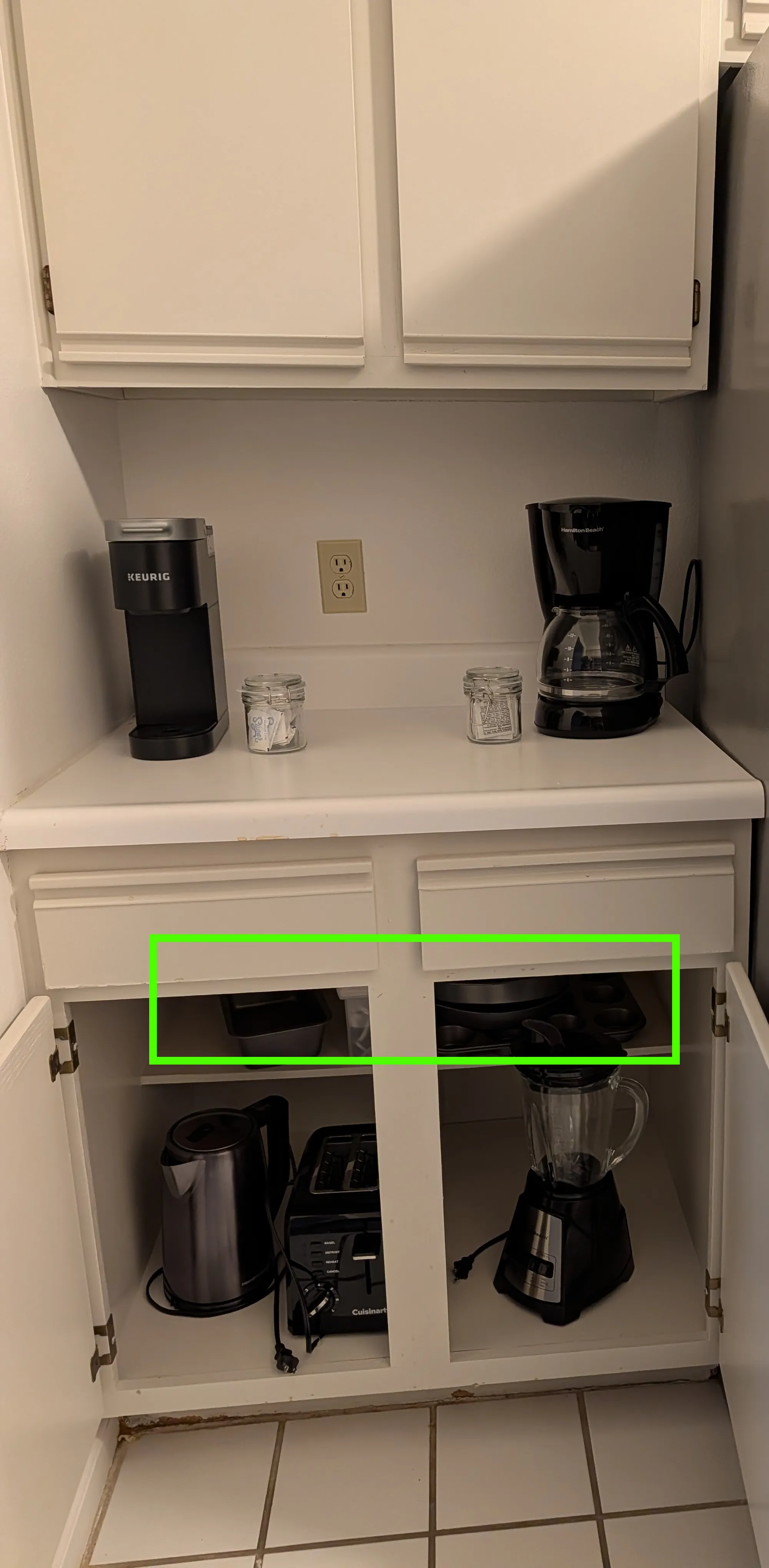
Electric Kettle, Toaster, Blender
  • Baking Sheet, Muffin Tins: Highlighted in GREEN
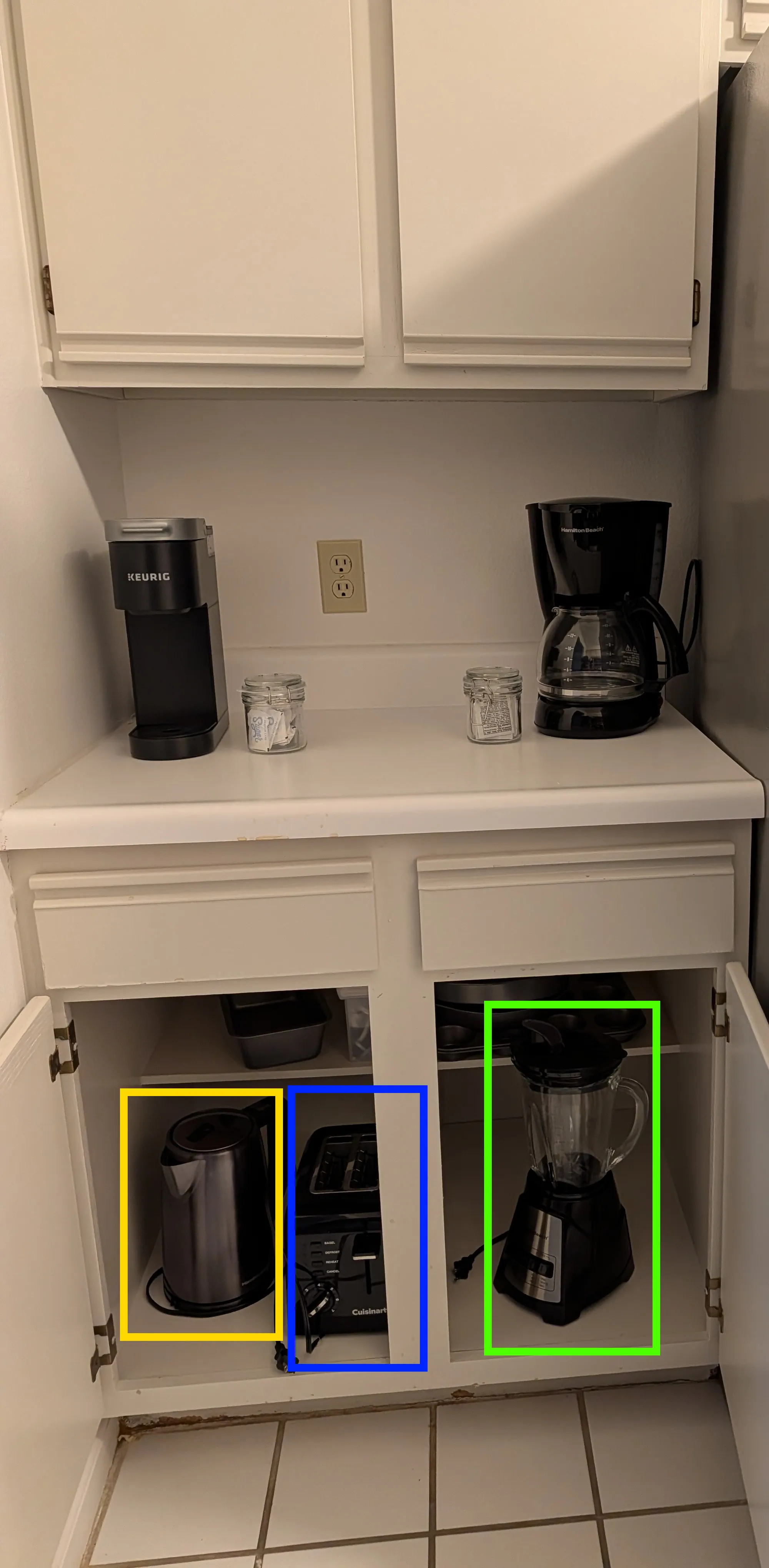
Electric Kettle, Toaster, Blender
  • Electric Kettle: Highlighted in YELLOW
  • Toaster: Highlighted in BLUE
  • Blender: Highlighted in GREEN

High Chair

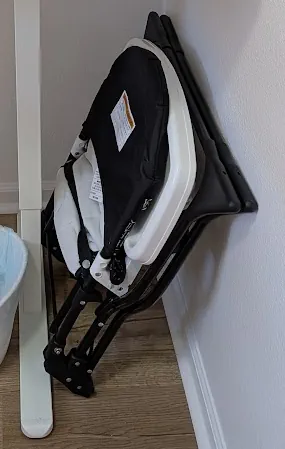
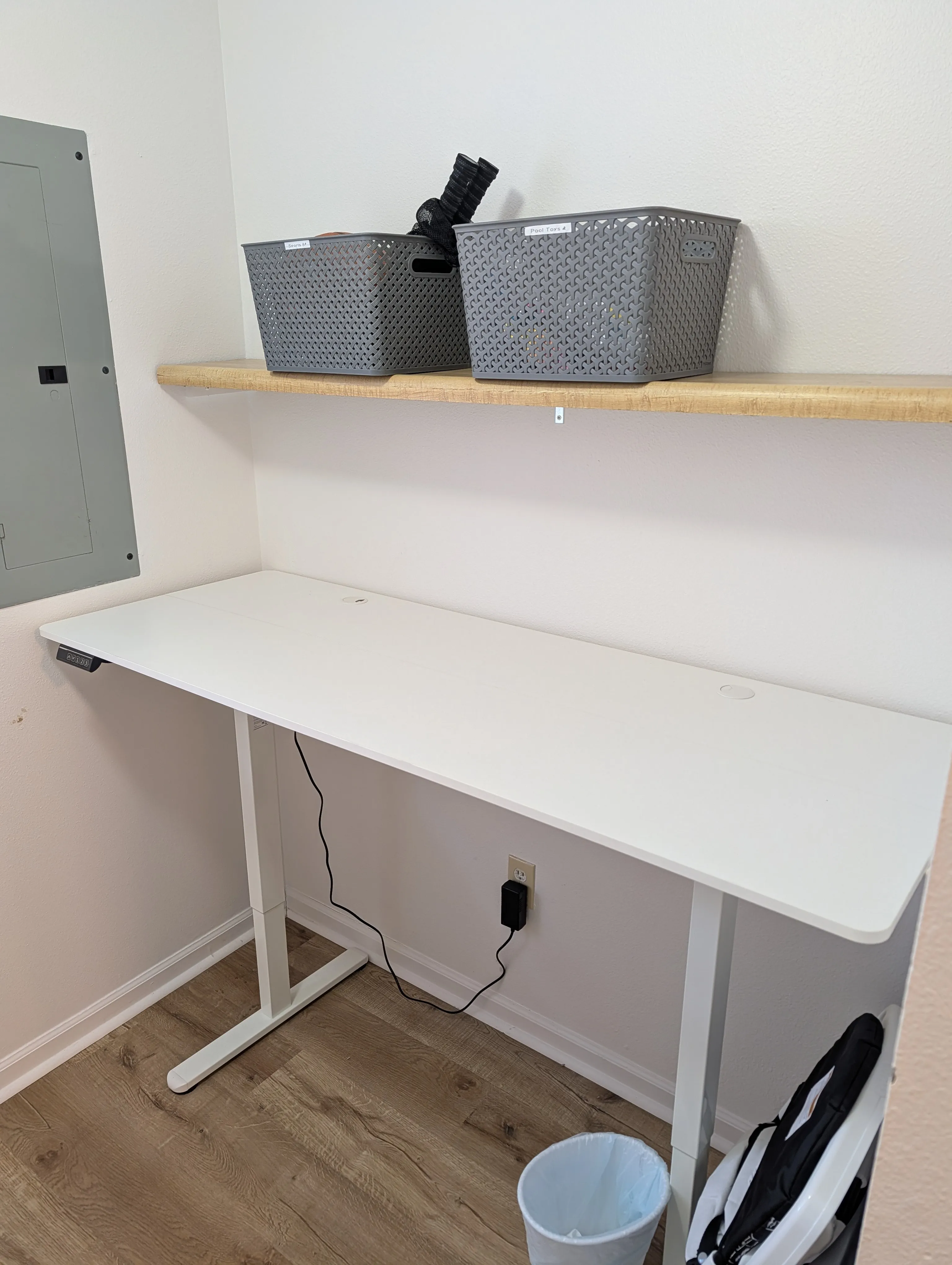
The high chair is located in the Laundry room, under the adjustable desk.

Packed up high chair

To Use:

Move the high chair to the desired location.
Unfold the legs
The chair should lock into place.

To Pack Away:

On the back of the chair, on the left and right side of the seat back there are buttons.
Press both of those buttons, and fold.

🛏️ Bedroom Comfort

Bed & Linens

Bedding Provided

  • Fresh sheets and pillowcases
  • Blankets and comforter
  • Extra pillows in closet
  • Additional blankets in closet

Storage Space

Closet: Hangers available

Dresser: Empty drawers for your use

Nightstands: Charging outlets available

Room Features

Lighting & Climate

Air Purifiers / White Noise Machine

Bedside lamps

Standing fan in closet

Curtains for better sleep

Additional Amenities

Full-length mirror

Luggage racks in closets

Iron and ironing board in closet

Air Purifier / White Noise Machine Operations

Air Purifier

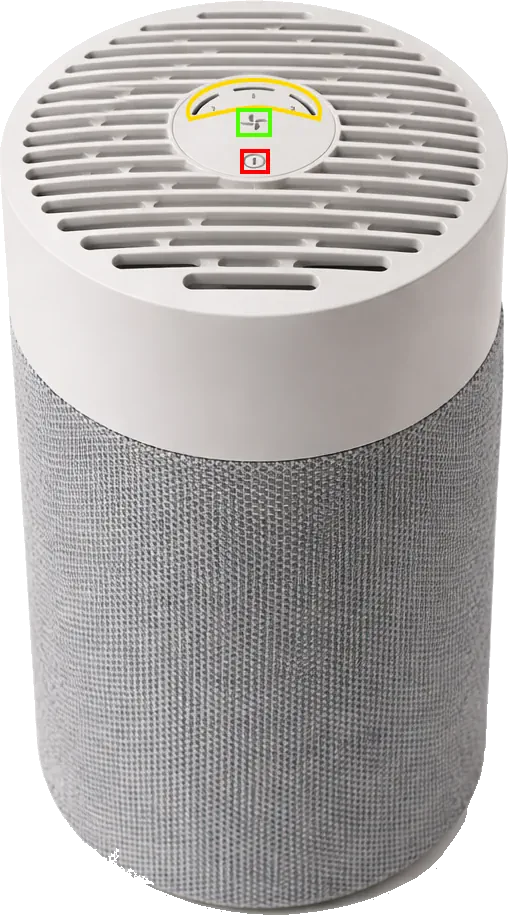
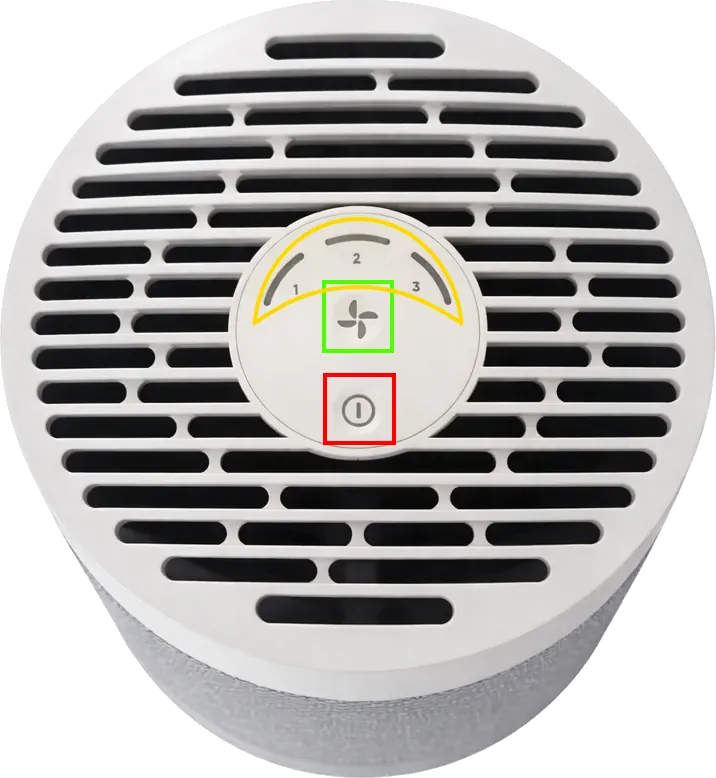
This is the Air Purifier / White Noise Machine
Air Purifier
Air Purifier
  • Power Button: Highlighted in RED
  • Fan Speed / Noise Volume Button: Highlighted in GREEN
  • Fan Speed / Noise Volume Indicator YELLOW

Power On

  • Hit the Power button (Highlighted Red)

Change the Speed / Volume

  • Hit the Fan Speed / Noise Volume button (Highlighted Green)
  • The indicator will change showing the current level

Additional Sleeping Spaces

Twin Rollaways

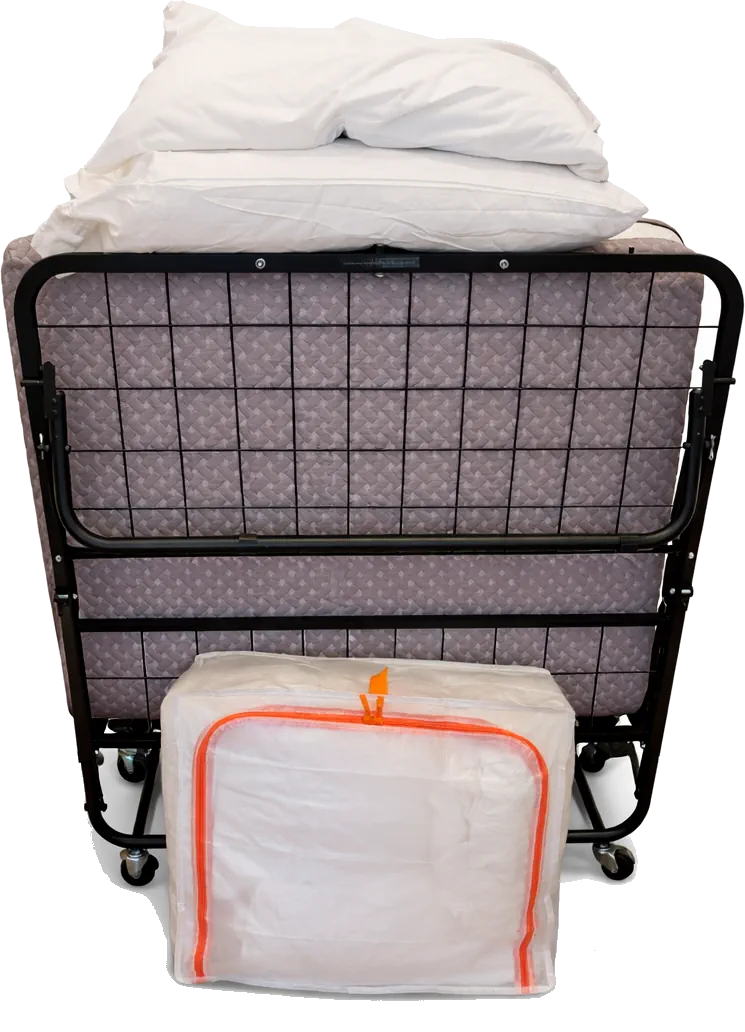
In each closet there is a twin rollaway and a clear bag with orange zippers that contains sheets and duvet for the bed.

Twin Rollaway Bed and Sheets

To Use:

Roll the bed to desiered location
(They can fit at the end of each bed or if you move the living room coffee table they will fit in there as well)
Unfold the bed and "lock" it in
Open the clear Bag with Orange zippers and remove the sheets
Put the fitted sheet, flat sheet, and duvet on
Ready to Sleep

Pack and Play

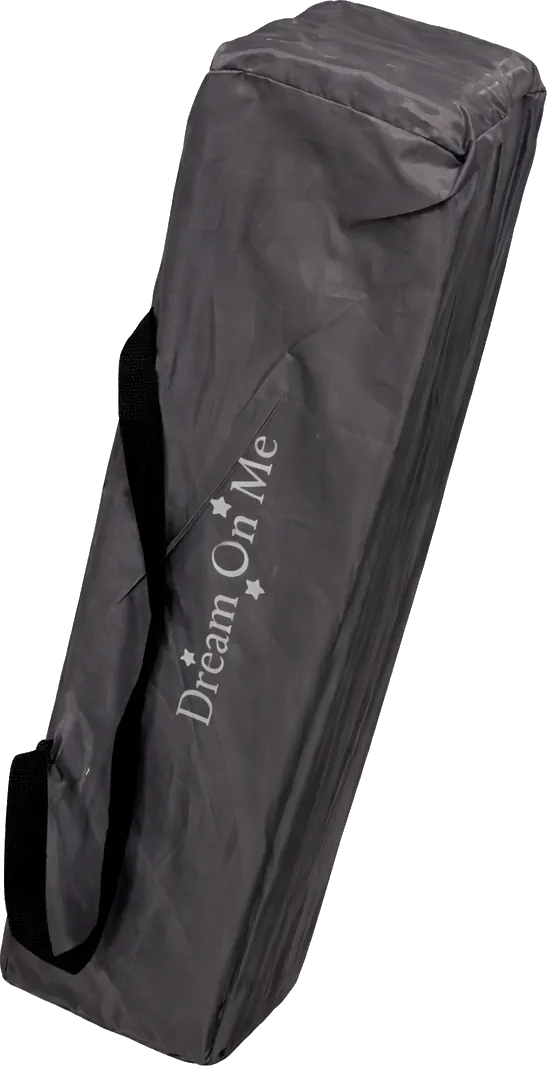
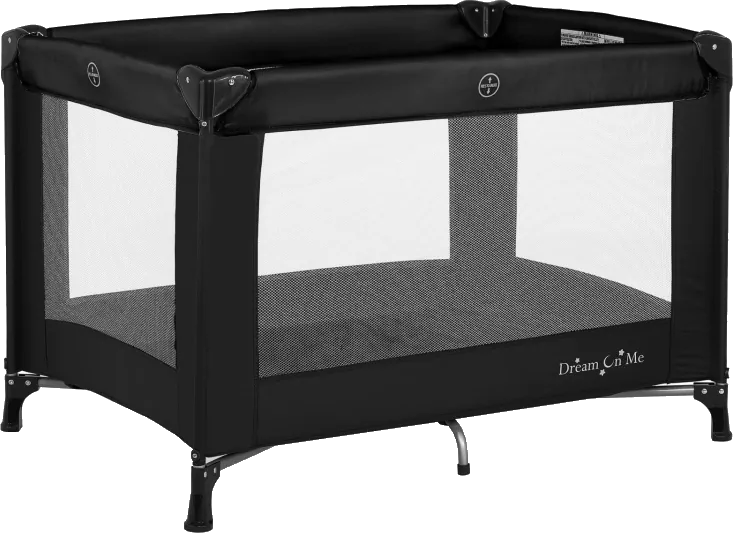
In the main bedroom's closet there is a packed up pack and play for your little ones.

This is what you will see in the Closet.

Packed up Pack and Play

This is what it looks like unpacked.

Pack and Play

To Use:

Open the velcro fastners
Remove playard and open
Leave the middle section pulled up
Extend the side panel support bars by tuggin on either side.
Once all 4 sides are locked, then push the bottom panel down.
Place the Mattress in the pen
You are all set.

🚿 Bathroom Essentials

Shower & Bath

Shower Operation

Turn handle counterclockwise for hot water
Allow 2-3 minutes for hot water
Pull up diverter for shower head
Adjust temperature as needed

Provided Amenities

  • Shampoo and conditioner
  • Body wash and soap
  • Clean towels and washcloths
  • Hair dryer under sink

Important Notes

Plumbing: Please don't flush anything other than toilet paper

Ventilation: Please use exhaust fan during showers

Towels: Place used towels in hamper, fresh ones under sinks

📶 WiFi & Technology

Internet Connection

WiFi Details

Network Name: Royal_Ridge_Guest

Password: B3-Our-Gues7

Speed: High-speed fiber connection

Router location: Living room far side table

Troubleshooting

If connection is slow, try disconnecting other devices
Router restart: Unplug for 30 seconds, plug back in
Contact us if issues persist

Available Technology

Entertainment

Work Setup

Remote Control Operations

TV Remote

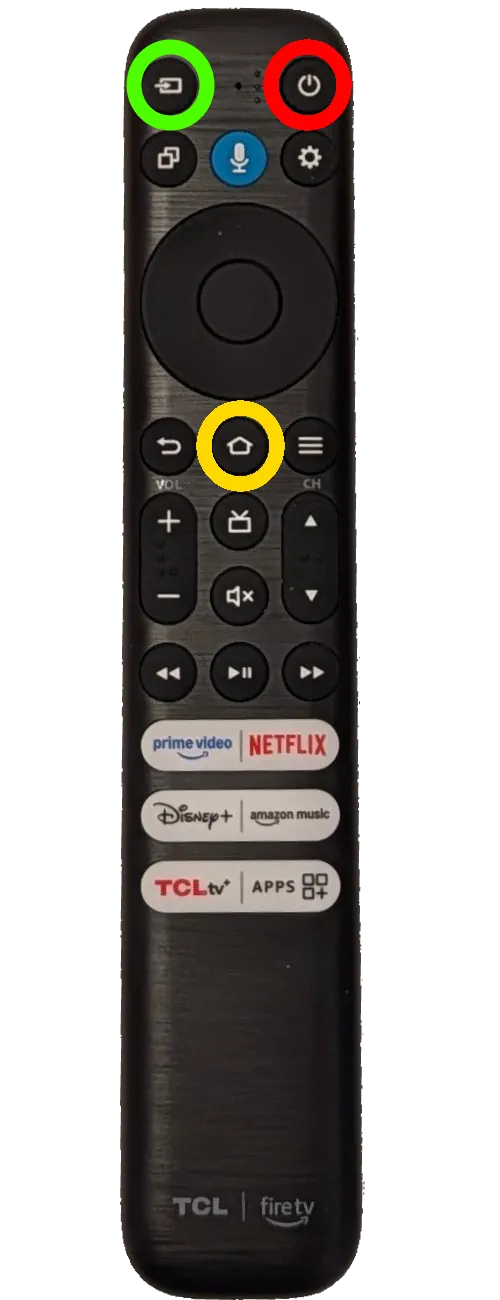
This is the remote to control the TV
TV Remote Control Input, Power, and Home Circled
  • Power Button: Highlighted in RED
  • Input Button: Highlighted in GREEN
  • Home Button: Highlighted in YELLOW

Go to streaming apps

  • Hit the Home button on the remote (Highlighted Yellow)
  • Navigate using the arrow keys

Change to Cable TV

  • Hit the Input button on the remote (Highlighted Green)
  • Select HDMI 1 (Cable)
  • Hit the Center select button.

Change to Super Nintendo

  • Hit the Input button on the remote (Highlighted Green)
  • Select HDMI 2 (Game Console).
  • Hit the Center select button.

Cable Remote

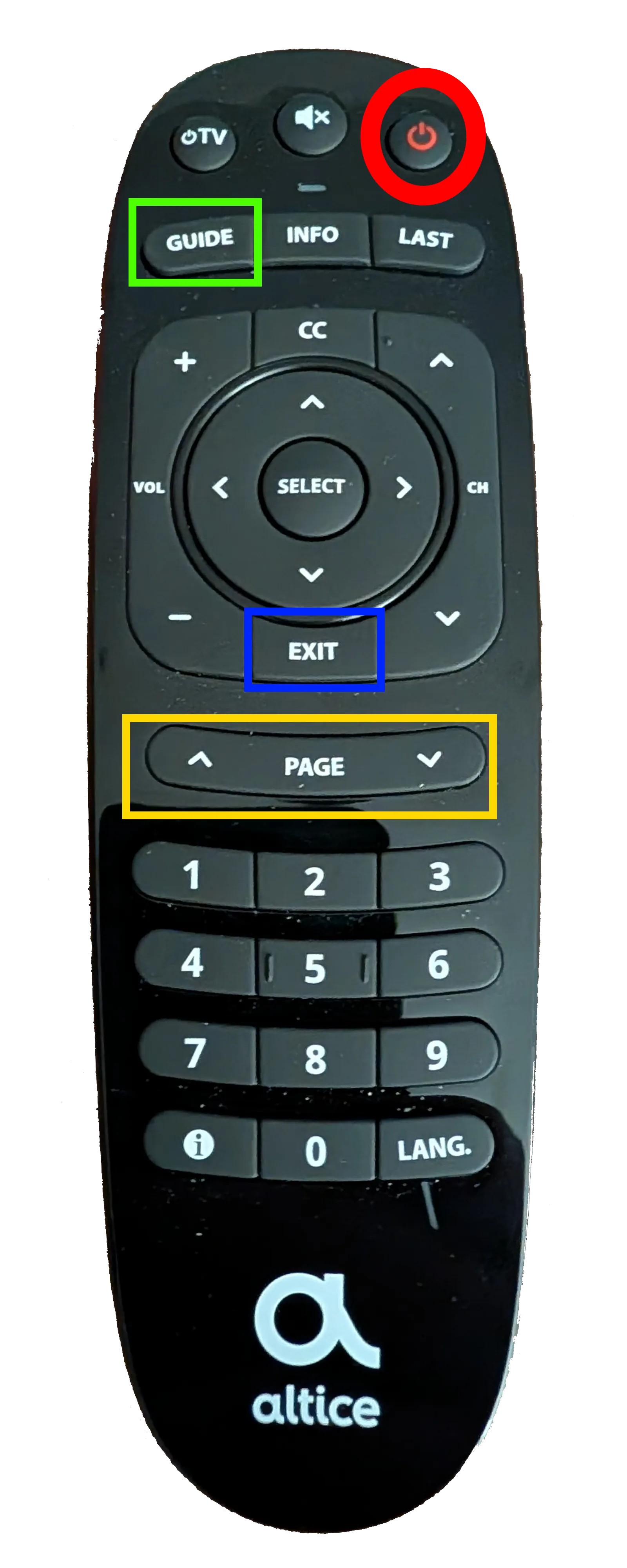
This is the remote to control the Cable TV Box
Cable Remote Control Power, Guide, Exit, and Page Controls Highlighted
  • Power Button: Highlighted in RED
  • Guide Button: Highlighted in GREEN
  • Exit Button: Highlighted in BLUE
  • Guide Page Controls: Highlighted in YELLOW

Pull up Cable TV Channel Guide

  • Hit the Guide button highlighted in green.
  • To exit the guide, hit the exit button highlighted in blue.

Use Page controls for faster guide navigation.

  • Hit the up or down guide page control buttons (Highlighted in yellow) to move several channels at a time in the guide.

If you are on HDMI 1 and there is a no input box on the TV.

  • Hit the power button on the cable remote. (The box should always be on, this is just in case)
  • If nothing is still being displayed please contact the host.
🏊 Property Amenities

Outdoor Spaces

Patio/Deck

Outdoor seating for relaxation

String lights for evening ambiance

Parking

Free lot parking for 2 cars

Well-lit and secure area

Clubhouse

Indoor Pool

Outdoor Pool

Hottub

Basketball Court

Pickleball Court

Giant Chess Game

Bar and Grill

Outdoor Tiki Bar(Summer Season Only)

Provided Items

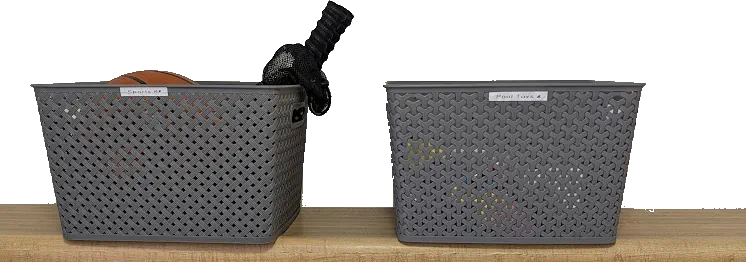
In the Laundry area of the Condo we provide baskets containing various equipment

Sports Equipment: including Basketball and Pickleball Balls and Paddles

Pool Toys: including disc, ball, and childrens inflatable floating ring

( Baskets Pictured Below)

Baskets with Sports Equipment and Pool Toys

Additional Services

Laundry

Washer and dryer room

Detergent provided

Drying rack also available

Folding Table

Special Features

  • Board games
  • Children Toys
  • Super Nintendo Mini Console

Work Area

Adjustable Desk

Located in the Laundry Room

Adjustable Standing / Sitting Desk

Adjustable Desk

Desk Operation

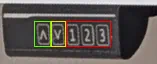
This is the desk operation panel (located to the far left of the desk)
Control Panel for Adjustable Desk
  • Raise Desk Button: Highlighted in GREEN
  • Lower Desk Button: Highlighted in YELLOW
  • Preset Buttons: Highlighted in RED

Raise Desk

Press the Raise Desk Button (Highlighted Green) until desired height.

Lower Desk

Press the Lower Desk Button (Highlighted Yellow) until desired height.

Presets

Hitting these will adjust the desk to pre-set heights (Highlighted Red)

📍 Local Area Guide

Nearby Essentials

Dining Recommendations

Activities & Attractions

Outdoor Activities

  • Private Parks
  • Private Playgrounds
  • Lake recreation area
  • Golf course
  • Beach access
  • Swimming Pool
  • Hot Tub
  • Basketball Court
  • Pickleball Court
  • Tennis Court
📋 House Rules & Policies

General Guidelines

Occupancy & Guests

  • Maximum occupancy: 6 guests
  • No unregistered overnight guests

Noise & Behavior

  • Quiet hours: 10 PM - 6 AM
  • No parties or events
  • No pets

Important Policies

Smoking: Strictly no smoking inside.

Pets: Pet policy - not allowed

Damages: Please report any accidental damage immediately

Lost Ammeneties Card: $50 replacement fee

🚨 Emergency Information

🆘 EMERGENCY SERVICES

CALL 911

Fire • Police • Medical Emergency

Property Emergency Contacts

Primary Host Contact

Name: Grand Welcome

Phone: (417)-213-8820

Available: 24/7 for emergencies

Response time: Within 2 hours

Local Services

Utilities & Safety

Safety Equipment

  • Carbon Monoxide Detector
  • Smoke detectors
  • Sprinkler System
  • Fire extinguisher in laundry
  • First aid kit under main bathroom cabinet

Thank You for Staying With Us!

We hope you have a wonderful stay. If you have any questions not covered in this guide, please don't hesitate to contact us.

⭐ We'd love a review of your stay! ⭐